• Home
  • Index
  • Search
  • Download
  • Server Rules
  • House Roleplay Laws
  • Player Utilities
  • Player Help
  • Forum Utilities
  • Returning Player?
  • Toggle Sidebar
Interactive Nav-Map
Tutorials
New Wiki
ID reference
Restart reference
Players Online
Player Activity
Faction Activity
Player Base Status
Discord Help Channel
DarkStat
Server public configs
POB Administration
Missing Powerplant
Stuck in Connecticut
Account Banned
Lost Ship/Account
POB Restoration
Disconnected
Member List
Forum Stats
Show Team
View New Posts
View Today's Posts
Calendar
Help
Archive Mode


Hi there Guest,  
Existing user?   Sign in    Create account
Login
Username:
Password: Lost Password?
 
  Discovery Gaming Community Discovery Development Discovery Mod General Discussion
« Previous 1 … 63 64 65 66 67 … 547 Next »
New Nebulae show their innards

Server Time (24h)

Players Online

Active Events - Scoreboard

Latest activity

Pages (2): 1 2 Next »
New Nebulae show their innards
Offline Sombs
10-23-2016, 02:37 AM,
#1
Three orange cats in a mech
Posts: 6,829
Threads: 503
Joined: Feb 2014

I'm currently playing around with Freelancer Mod Studio and actually make some progress. However, there is a problem I encounter when I create new nebulae. When you're outside the nebula, you can see what it contains, for example rocks. When you enter the nebula, all objects within the nebula become invisible (but they are still there). The nebulae are linked to their own nebulae file and are also having both the nebula designator and the defined nebula zone on the map. However, for example like the nebula in Delta, the big objects within it aren't hidden. Anyone knows what's happening?


Uncharted System Stories: 18 | 32 | 34 | 37 | 38 | 85

Templates: Character | Transmissions


Reply  
Offline Sombs
10-24-2016, 08:51 PM,
#2
Three orange cats in a mech
Posts: 6,829
Threads: 503
Joined: Feb 2014

Bump!


Uncharted System Stories: 18 | 32 | 34 | 37 | 38 | 85

Templates: Character | Transmissions


Reply  
Offline Xalrok
10-24-2016, 09:08 PM,
#3
Member
Posts: 652
Threads: 58
Joined: May 2009

Sounds like it may be something to do with the [Fog] values in the nebula ini. You could post the code of the nebula file and the zone itself and I could take a look at it if it turns out to be something more complicated than that.
Reply  
Offline Sombs
10-24-2016, 09:23 PM, (This post was last modified: 10-24-2016, 09:29 PM by Sombs.)
#4
Three orange cats in a mech
Posts: 6,829
Threads: 503
Joined: Feb 2014

That's basically with every new nebula I create using the Freelancer Mod Studio. For example, I added a new nebula to Omicron Delta, basically copying the values of the Omicron Delta Edge Nebula. I took away the Exclusion Zones, since Freelancer crashes if the exclusion zones aren't exactly where they should be. So this nebula has no exclusion zone and it only contains rocks, like the original ODEN does. Ingame, it looks like this right now:

[+]Spoiler
[Image: dvYySWo.gif]
Once I enter the cloud, the rocks become invisible, no matter how far I am away from them. Even if I collide with them, they stay invisible. When I tested placing a new nebula in another system, I had similar issues, making an jumphole invisible. I conclude it has nothing to do with the size of the objects the nebula contains.

[+]Spoiler
[Image: Bnbw6DD.gif]


It's also not the objects that cause the issue, as I scaled up the size of the ODEN once to see if they get hidden as they should. Worked then, however, that's not the solution.


Uncharted System Stories: 18 | 32 | 34 | 37 | 38 | 85

Templates: Character | Transmissions


Reply  
Offline Xalrok
10-24-2016, 09:40 PM,
#5
Member
Posts: 652
Threads: 58
Joined: May 2009

Your new nebula might be overlapping with the old one, which can cause models inside to turn invisible (this used to happen in Minnesota at the corners of the system.)

If that's not the case though, you could open up the system file and the nebula file in a text editor and post the code for the zone and the nebula like I've done here. Then I might be able to track down the problem faster by looking at it myself and tell you what was causing it.

[+]Spoiler
Code:
[zone]
nickname = Zone_GA03_nouvionnebula_01
ids_name = 506346
pos = 50000, 0, 40000
rotate = 0, 32, 0
shape = ELLIPSOID
size = 32000, 12000, 21000
property_flags = 32768
property_fog_color = 120, 90, 120
damage = 0
visit = 32
spacedust = attractdust
spacedust_maxparticles = 50
interference = 0.000000
ids_info = 506347
comment = Nouvion
sort = 20
toughness = 6
density = 5
repop_time = 15
max_battle_size = 4
pop_type = nonlootable_ast_field
relief_time = 35
encounter = area_scavenger, 12, 0.3
faction = fc_brigands_grp, 0.6
faction = fc_maquis_grp, 0.4
encounter = area_assault, 12, 0.1
faction = ga_n_grp, 0.4
faction = ga_p_grp, 0.6
music = zone_nebula_barrier
[+]Spoiler
Code:
[TexturePanels]
file = solar\nebula\nomad.ini
file = solar\nebula\generic_shapes.ini
[Fog]
fog_enabled = 1
near = 0
distance = 2000
color = 39, 12, 3
[Exterior]
shape = nomad_exterior1
shape = nomad_exterior2
shape = nomad_exterior3
shape = nomad_exterior4
shape_weights = 1, 1, 1, 1
fill_shape = nebula_circle2
plane_slices = 5
bit_radius = 8000
bit_radius_random_variation = 0.200000
min_bits = 4
max_bits = 8
move_bit_percent = 0.750000
equator_bias = 0.500000
color = 225, 73, 0
[NebulaLight]
ambient = 39, 12, 3
sun_burnthrough_intensity = 0.250000
sun_burnthrough_scaler = 0.750000
[Clouds]
max_distance = 800
puff_count = 20
puff_radius = 450
puff_colora = 183, 10, 0
puff_colorb = 255, 83, 0
puff_max_alpha = 0.500000
puff_shape = nomad_cloud1
puff_shape = nomad_cloud2
puff_shape = nomad_cloud4
puff_shape = nomad_cloud3
puff_weights = 1, 2, 3, 4
puff_drift = 8.000000
near_fade_distance = 300, 800
lightning_intensity = 0.000000
lightning_color = 92, 64, 92
lightning_gap = 20.000000
lightning_duration = 0.500000
[DynamicLightning]
gap = 0.200000
duration = 0.300000
color = 240, 170, 130
ambient_intensity = 0
intensity_increase = 1
[BackgroundLightning]
duration = 0
gap = 2
color = 252, 255, 115
Reply  
Offline Sombs
10-24-2016, 09:50 PM,
#6
Three orange cats in a mech
Posts: 6,829
Threads: 503
Joined: Feb 2014

They are far enough away from each other. :C

[Image: pda04_by_rhulaner-dam84nn.png]


[+]Nebula ini
Code:
[TexturePanels]
file = solar\nebula\dsy_edge.ini
file = solar\nebula\dsy_nomad.ini
file = solar\nebula\dsy_dark.ini
file = solar\nebula\edge_shapes.ini
file = solar\nebula\nomad.ini
[Exterior]
shape = dsy_edge5_cloud1
shape = dsy_edge5_cloud2
shape = dsy_edge5_cloud3
shape = dsy_edge5_cloud4
shape_weights = 1, 1, 1, 1
fill_shape = edge_circle
plane_slices = 10
bit_radius = 6000
bit_radius_random_variation = 0.200000
min_bits = 6
max_bits = 9
move_bit_percent = 0.250000
equator_bias = 0.25
color = 102, 90, 102
[Exclusion Zones]
[properties]
flag = nebula
[NebulaLight]
ambient = 20, 33, 31
sun_burnthrough_intensity = 1
sun_burnthrough_scaler = 1
[Clouds]
max_distance = 3000
puff_count = 30
puff_radius = 800
puff_colora = 51, 83, 78
puff_colorb = 83, 145, 135
puff_max_alpha = 0.350000
puff_shape = nomad_cloud5
puff_shape = nomad_cloud6
puff_shape = nomad_cloud7
puff_shape = nomad_cloud8
puff_weights = 1, 1, 1, 1
puff_drift = 2.000000
near_fade_distance = 600, 2000
[Clouds]
max_distance = 800
puff_count = 20
puff_radius = 220
puff_colora = 51, 83, 78
puff_colorb = 83, 145, 135
puff_max_alpha = 0.150000
puff_shape = dsy_edge3_cloud1
puff_shape = dsy_edge3_cloud2
puff_shape = dsy_edge3_cloud3
puff_shape = dsy_edge3_cloud4
puff_weights = 1, 1, 1, 1
puff_drift = 2.000000
near_fade_distance = 150, 500
[Fog]
fog_enabled = 1
near = 400
distance = 2500
color = 20, 38, 35
[DynamicLightning]
gap = 50
duration = 0
color = 0, 0, 0
ambient_intensity = 0
intensity_increase = 0
[+]Zone and Nebula link
Code:
[zone]
nickname = Zone_ST04_nebula_plus
ids_name = 515156
pos = 45000, -4000, -93800
rotate = 0, 40, 0
shape = ELLIPSOID
size = 19000, 16000, 19000
property_flags = 32768
property_fog_color = 40, 85, 70
visit = 32
spacedust = attractdust_purple
spacedust_maxparticles = 50
ids_info = 515157
sort = 20
toughness = 19
density = 10
repop_time = 10
max_battle_size = 10
pop_type = Background
relief_time = 10
encounter = area_nomads, 15, 0.6
faction = fc_n_grp, 1
encounter = gunboats_nomads, 19, 1
Music = zone_nebula_nomad
;

Code:
[Nebula]
file = solar\nebula\ST04_nebula_plus.ini
zone = Zone_ST04_nebula_plus
;
Reply  
Offline Treewyrm
10-25-2016, 01:32 PM,
#7
Alchemist
Posts: 2,084
Threads: 61
Joined: Jul 2007

Nebula zones typically need edge_fraction property set to some value, most commonly it would be 0.25. Overall be aware that large objects need substantially larger zones around them, because you need to take into account factors like zone inset transition border to create fading effect when entering or leaving zone.
Reply  
Offline Sombs
10-25-2016, 03:39 PM,
#8
Three orange cats in a mech
Posts: 6,829
Threads: 503
Joined: Feb 2014

I tried the values, but that didn't fix it, sadly. The original Omicron Delta Edge Nebula doesn't have edge_fraction set to any value, yet it works, and scaling up the nebula doesn't seem to work as well, as a placed and working jump hole isn't shown either, even in another new nebula. I'll try a bit more. Smile


Uncharted System Stories: 18 | 32 | 34 | 37 | 38 | 85

Templates: Character | Transmissions


Reply  
Offline Treewyrm
10-25-2016, 03:56 PM,
#9
Alchemist
Posts: 2,084
Threads: 61
Joined: Jul 2007

Keep in mind exclusion zones within nebula zones also affect visibility, not only within themselves and nebula but also outside neubla. As a rule of thumb zones that are used for nebula and exclusion zones within nebula should have edge_fraction property which controls transition border depth, which in turn affects camera far plane as well as depth buffer and render order mechanism. Whoever poked around Omicron Delta has probably forgot to add it.
Reply  
Offline Sombs
10-25-2016, 04:40 PM,
#10
Three orange cats in a mech
Posts: 6,829
Threads: 503
Joined: Feb 2014

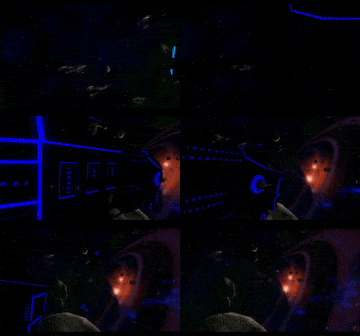
The thing is, by randomly opening systems, I have only seen the nebulae in Iota using edge_fraction. In other systems, I only saw the exclusion zones using edge_fraction, but nevertheless, adding those values to my nebulae didn't help. Both the rocks in my Omicron Delta Edge nebula_plus are still visible from the outside and invisible from the inside (this nebula has no exclusion zones, just the rocks inside) and the other nebula in a new system, which contains one exclusion zone and a jump hole, still doesn't show the jump hole in the inside. :C



Uncharted System Stories: 18 | 32 | 34 | 37 | 38 | 85

Templates: Character | Transmissions


Reply  
Pages (2): 1 2 Next »


  • View a Printable Version
  • Subscribe to this thread


Users browsing this thread:
1 Guest(s)


Powered By MyBB, © 2002-2026 MyBB Group. Theme © 2014 iAndrew & DiscoveryGC
  • Contact Us
  •  Lite mode
Linear Mode
Threaded Mode